





Multiday Tour
Shirakawa-go Line Bus Non-Reserved Seat Ticket
Available Options
One-way ticket from Takayama to Shirakawa-go
Included
- One-way transfer ticket
- One-way non-reserved ticket from Takayama Nohi Bus Center to Shirakawa-go
Not Included
- Reserved seat
Confirmation
- You'll get confirmation within minutes. If you don't see any confirmation, reach out to our customer support.
Usage validity
- The voucher is valid until 1 Dec 2026 23:59
Voucher type
- Present your mobile voucher
Redemption information
- Present your QR code/voucher to enter directly
Takayama Nohi Bus Center
-
Please refer to the map for assistance
-
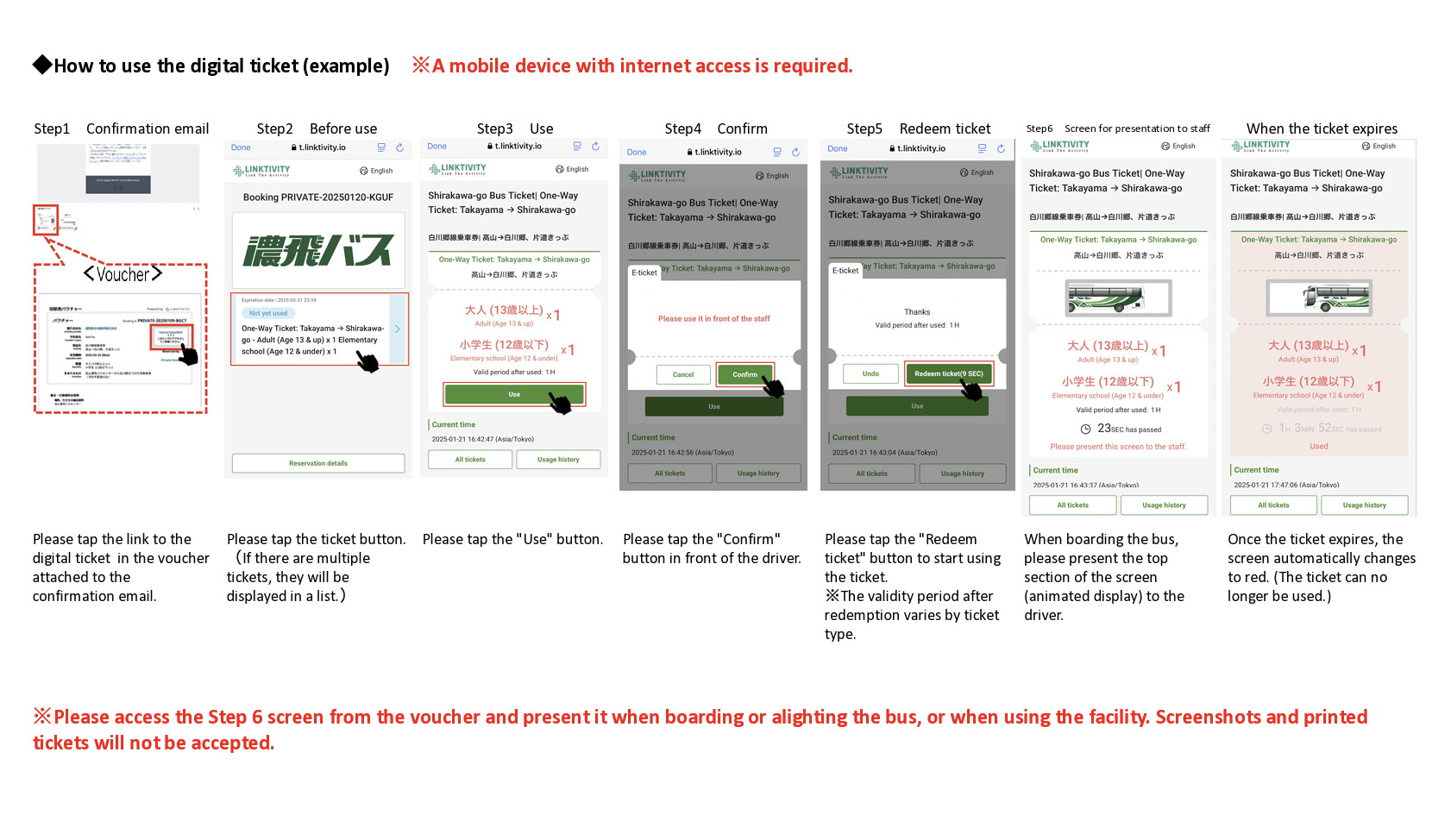
When boarding, open the usage screen from the link sent to you at the time of purchase, press the “Use” button, and show the screen to a staff member (driver)
-
Please ensure you have a stable network connection, as you will need to access the web page on your smartphone
-
Screenshots and printed copies cannot be accepted
-
If you purchase multiple tickets in one transaction, they cannot be used separately, and all tickets will be activated simultaneously. To use the tickets individually, please purchase them separately
-
For security purposes, you may be required to authenticate using a one-time password (OTP). If prompted, please follow the steps below:
-
- Enter the email address to receive the OTP and press the send button
-
- Check that the OTP has been received by the email address set up in step 1. (The email containing the OTP will be sent from the domain “@linktivity.co.jp.” Please also check your spam folder just to be sure. If you can’t find it there, your email address may be incorrect. Open the URL for the usage screen from the voucher again and try again by entering your email address.)
-
- Enter the OTP listed in the received email into the ticket screen and press the Confirm button. If you enter it correctly, the usage screen will be displayed. (Once OTP authentication is complete, the OTP will be sent to the email address you set. This email address cannot be changed, so please set an email address that can be confirmed locally on the day of use.)
- How to use the digital ticket
How to use the digital ticket

One-way ticket from Shirakawa-go to Takayama
Included
- One-way transfer ticket
- One-way non-reserved ticket from Shirakawa-go to Takayama Nohi Bus Center
Not Included
- Reserved seat
Confirmation
- You'll get confirmation within minutes. If you don't see any confirmation, reach out to our customer support.
Usage validity
- The voucher is valid until 1 Dec 2026 23:59
Voucher type
- Present your mobile voucher
Redemption information
- Present your QR code/voucher to enter directly
Shirakawa-go Bus Terminal
-
Please refer to the map for assistance
-
When boarding, open the usage screen from the link sent to you at the time of purchase, press the “Use” button, and show the screen to a staff member (driver)
-
Please ensure you have a stable network connection, as you will need to access the web page on your smartphone
-
Screenshots and printed copies cannot be accepted
-
If you purchase multiple tickets in one transaction, they cannot be used separately, and all tickets will be activated simultaneously. To use the tickets individually, please purchase them separately
-
For security purposes, you may be required to authenticate using a one-time password (OTP). If prompted, please follow the steps below:
-
- Enter the email address to receive the OTP and press the send button
-
- Check that the OTP has been received by the email address set up in step 1. (The email containing the OTP will be sent from the domain “@linktivity.co.jp.” Please also check your spam folder just to be sure. If you can’t find it there, your email address may be incorrect. Open the URL for the usage screen from the voucher again and try again by entering your email address.)
-
- Enter the OTP listed in the received email into the ticket screen and press the Confirm button. If you enter it correctly, the usage screen will be displayed. (Once OTP authentication is complete, the OTP will be sent to the email address you set. This email address cannot be changed, so please set an email address that can be confirmed locally on the day of use.)
- How to use the digital ticket
How to use the digital ticket

Round-trip ticket between Takayama and Shirakawa-go
Included
- Round-trip transfer ticket
- Roundtrip non-reserved ticket between Shirakawa-go to Takayama Nohi Bus Center
Not Included
- Reserved seat
Confirmation
- You'll get confirmation within minutes. If you don't see any confirmation, reach out to our customer support.
Usage validity
-
The voucher is valid until 1 Dec 2026 23:59
-
Once the voucher is activated, it is only valid for use on the same day
Voucher type
- Present your mobile voucher
Redemption information
- Present your QR code/voucher to enter directly
Takayama Nohi Bus Center
- Please refer to the map for assistance
Shirakawa-go Bus Terminal
-
Please refer to the map for assistance
-
When boarding, open the usage screen from the link sent to you at the time of purchase, press the “Use” button, and show the screen to a staff member (driver)
-
Please ensure you have a stable network connection, as you will need to access the web page on your smartphone
-
Screenshots and printed copies cannot be accepted
-
If you purchase multiple tickets in one transaction, they cannot be used separately, and all tickets will be activated simultaneously. To use the tickets individually, please purchase them separately
-
For security purposes, you may be required to authenticate using a one-time password (OTP). If prompted, please follow the steps below:
-
- Enter the email address to receive the OTP and press the send button
-
- Check that the OTP has been received by the email address set up in step 1. (The email containing the OTP will be sent from the domain “@linktivity.co.jp.” Please also check your spam folder just to be sure. If you can’t find it there, your email address may be incorrect. Open the URL for the usage screen from the voucher again and try again by entering your email address.)
-
- Enter the OTP listed in the received email into the ticket screen and press the Confirm button. If you enter it correctly, the usage screen will be displayed. (Once OTP authentication is complete, the OTP will be sent to the email address you set. This email address cannot be changed, so please set an email address that can be confirmed locally on the day of use.)
- How to use the digital ticket
How to use the digital ticket

Round-trip ticket + Shirakawa-go Gassho-zukuri Village Ticket
Included
- Round-trip transfer ticket
- Round-trip non-reserved ticket between Shirakawa-go and the Takayama Nohi Bus Center
- An admission ticket to Shirakawa-go Gassho-zukuri Village
Not Included
- Other personal expenses
- Reserved seat
Confirmation
- You'll get confirmation within minutes. If you don't see any confirmation, reach out to our customer support.
Usage validity
- The voucher is valid for 90 day(s) from the booking confirmation date. It expires at 23:59 on the last day
Voucher type
- Present your mobile voucher
- Please present the voucher and admission ticket at Shirakawa-go Gassho-zukuri village
Pick-up and drop-off information
- Take the bus bound for Shirakawa-go from platform 4 at the Takayama Nohi Bus Center
- For other bus stops, please check here
Redemption information
- Present your QR code/voucher to enter directly
Takayama Nohi Bus Center
- Please refer to the map for assistance
Shirakawa-go Bus Terminal
-
Please refer to the map for assistance
-
When boarding, open the usage screen from the link sent to you at the time of purchase, press the “Use” button, and show the screen to a staff member (driver)
-
Please ensure you have a stable network connection, as you will need to access the web page on your smartphone
-
Screenshots and printed copies cannot be accepted
-
If you purchase multiple tickets in one transaction, they cannot be used separately, and all tickets will be activated simultaneously. To use the tickets individually, please purchase them separately
-
For security purposes, you may be required to authenticate using a one-time password (OTP). If prompted, please follow the steps below:
-
- Enter the email address to receive the OTP and press the send button
-
- Check that the OTP has been received by the email address set up in step 1. (The email containing the OTP will be sent from the domain “@linktivity.co.jp.” Please also check your spam folder just to be sure. If you can’t find it there, your email address may be incorrect. Open the URL for the usage screen from the voucher again and try again by entering your email address.)
-
- Enter the OTP listed in the received email into the ticket screen and press the Confirm button. If you enter it correctly, the usage screen will be displayed. (Once OTP authentication is complete, the OTP will be sent to the email address you set. This email address cannot be changed, so please set an email address that can be confirmed locally on the day of use.)
Choose from available options above
Cancellation Policy
- 100% refunds will be issued for cancellations made before a voucher is activated and within the voucher validity
Similar Activities
Multiday Tour
Walking Tour
Takayama Half-Day Private Guided Tour
Museums & Galleries
Hida Great Limestone Cave & Ohashi Collection Museum Admission in Takayama
Hot Spring